
Show the Right Experiment to the Right Audience
CROLabs Personalization and Targeting lets you control exactly who enters each experiment. Cleaner segments. Cleaner results. Higher conversion rates.
No credit card required · Cancel anytime
Smarter Targeting, Cleaner Data
Filter First, Then Split
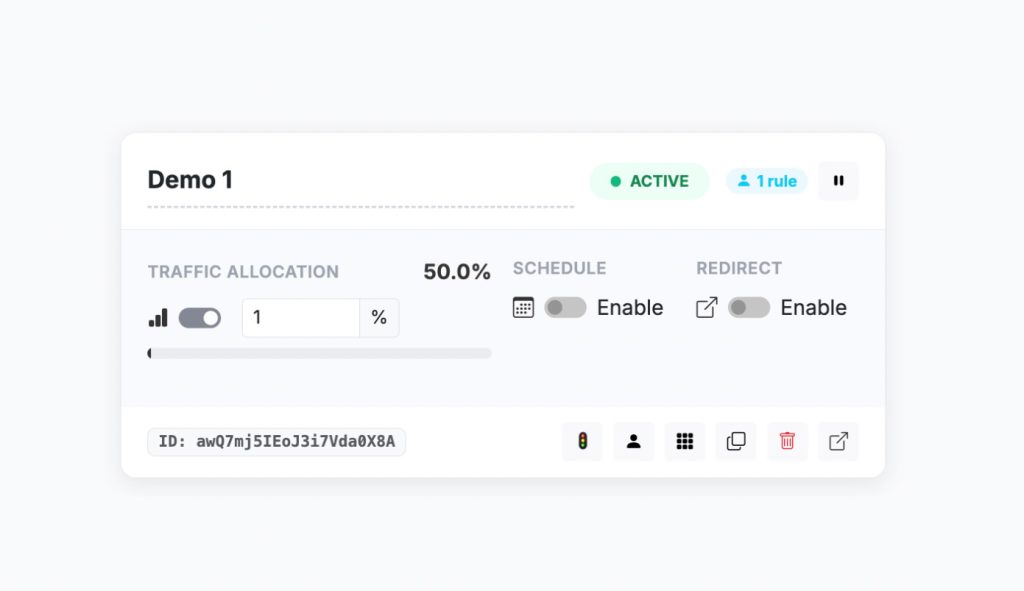
When a visitor lands on your page, CROLabs checks them against your targeting rules. If they match, they enter the test and get split between control and variant. If they don’t match, they see the original page and aren’t counted as tested users.
Rules are stackable. Add multiple filters to the same experiment, and a visitor needs to match all of them to enter the test. “Mobile visitors coming from Google Ads” takes just two rules.
Each experiment has its own targeting settings. Run one test for mobile visitors and a completely different test for desktop users on the same page, at the same time, without them interfering with each other.
The result: every experiment only includes the audience it was designed for. No contamination. No wasted traffic. No misleading results.
Target by Device, Screen, or Traffic Source
Three Targeting Signals You Can Use Right Now
Every rule uses a signal, an operator, and a value. You pick who gets in and who doesn’t.
Device type.
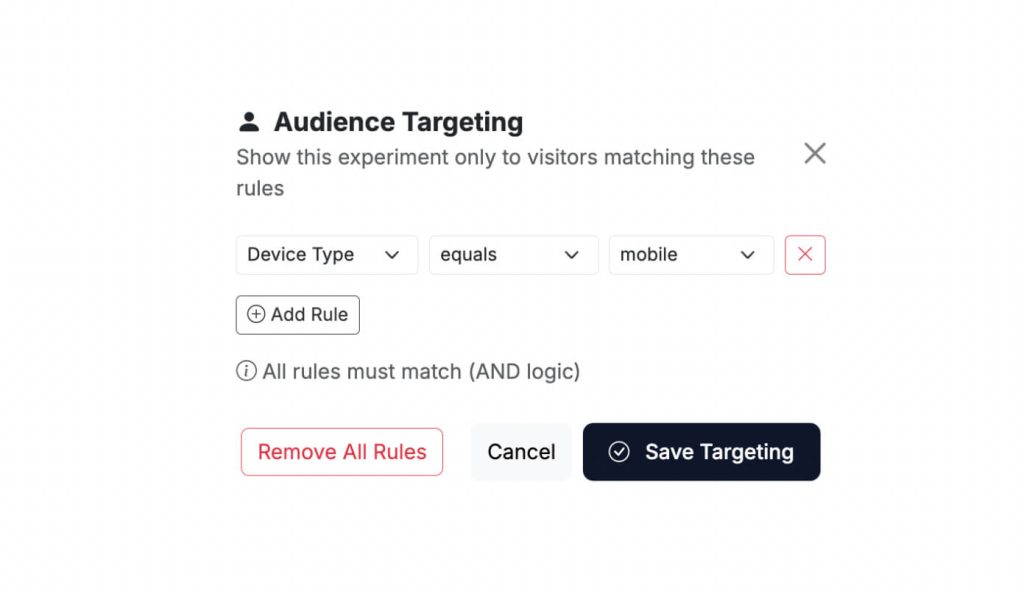
Target by mobile, tablet, or desktop. This is the most common filter. Testing a redesigned mobile checkout? Set the experiment to mobile only. Desktop visitors never enter the test and your results stay clean.
Screen size.
Target by screen width in pixels. More precise than device type when your changes depend on a specific breakpoint. Target screens wider than 768px to include tablets in landscape and desktops but exclude phones. Or go the other way and only include narrow screens.
Referrer.
Target by where the visitor came from. Use "contains" to match partial URLs like "google.com" for all Google traffic, or "equals" for an exact match. Perfect for testing a variant only for visitors arriving from a specific campaign, ad platform, or partner site.
Stop Wasting Traffic on the Wrong Audience
What You Can Do With Targeting
Run device-specific tests without cross-contamination. Your mobile and desktop audiences behave differently. A CTA that converts on desktop might get ignored on a small screen. Targeting lets you test each device separately and get results that actually apply to that audience.
Test paid traffic separately from organic. Visitors from a Google Ad have different intent than someone who found you through a blog post. Use a referrer filter to show a variant only to paid visitors so you can optimize the landing page for the traffic you’re paying for. Better landing page performance means lower CAC and higher ROAS on every campaign.
Run parallel experiments on the same page. One experiment for mobile, another for desktop. One for paid traffic, another for organic. Targeting makes this possible without the experiments interfering with each other. More experiments running simultaneously means faster learnings.
Isolate a specific screen size for layout tests. If you’re testing a layout change that only kicks in above 1024px, filter for that screen width. Visitors on smaller screens never enter the test, so your results reflect only the audience that actually sees the change.
Set Up in Under 30 Seconds
Add Targeting Rules in Seconds
Open your experiment. Go to the Audience Targeting panel. Click Add Rule. Pick your signal, choose an operator, set the value. Add more rules if you need to. Save.
Set your rules before you launch whenever possible. Changing targeting on a live test affects who enters going forward. If you significantly narrow or widen your audience mid-experiment, the data before and after the change isn’t directly comparable.
Why Targeting Changes Your Test Results
The Revenue Impact of Showing the Right Test to the Right People
Without targeting, every experiment averages across all your visitors. Mobile users, desktop users, paid traffic, organic traffic, all mixed together. You might have a variant that converts 25% better for mobile visitors, but when diluted across desktop traffic that doesn’t see the change properly, it looks like a 3% improvement. Not enough to call. So you kill the test.
Targeting fixes this.
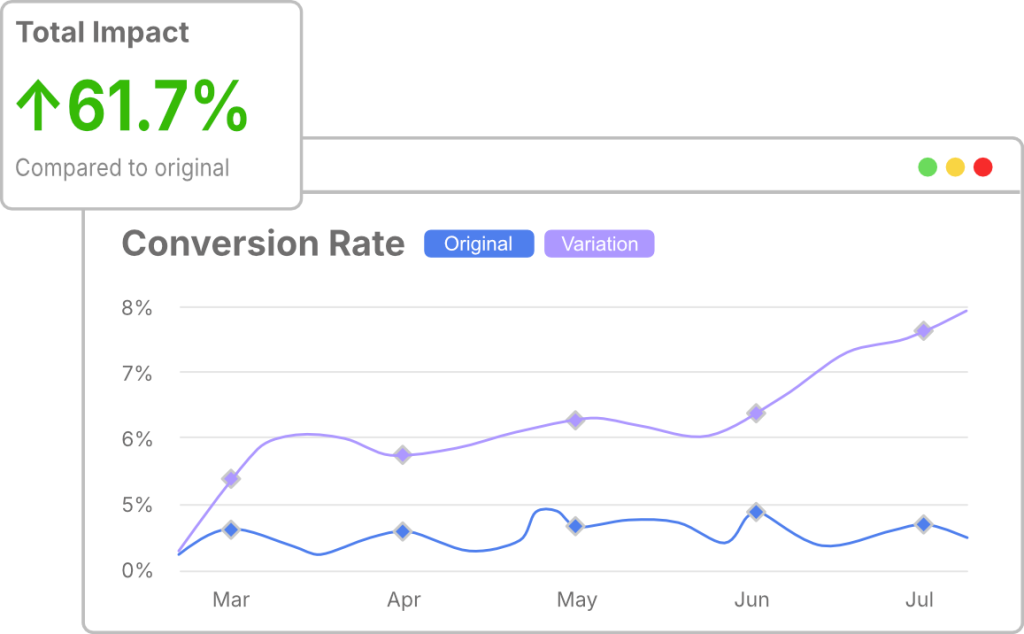
Cleaner data, faster decisions. When your test only includes the audience it was designed for, you reach statistical significance faster and your results are actually actionable.
Higher win rates. Targeted experiments are more likely to produce clear winners because the variant matches the audience. Teams that use targeting consistently report 30-40% more winning tests than teams that test everyone at once.
Better ROAS on paid traffic. When you test landing page variants only for visitors coming from specific campaigns, you optimize the exact pages your ad budget is paying for. Every improvement goes directly to your bottom line.
More experiments, less risk. Running parallel targeted experiments on the same page means you can test more hypotheses simultaneously without contamination. More tests per month means more learnings per month means more conversions per month.

Coming Soon
More Signals on the Way
Device, screen size, and referrer are what’s available today. We’re building more.
UTM parameters, geolocation, and new vs returning visitors are all in development. Target by campaign, by country, and by whether someone has been to your site before.
Follow what’s coming on our crolabs.com/realeases.

Built and Hosted in the EU
GDPR-Compliant by Default
CROLabs does not collect personally identifiable information. No names, no emails, no IP addresses. Built and hosted entirely in the EU. No US data transfers.
The visual editor works client-side. Changes are applied as overlays, not injected into your codebase. Search engines always see your original page. Your Core Web Vitals stay clean.
Testimonials
Your Words. Not Ours.

We switched from VWO because the pricing was getting out of hand. CROLabs does everything we need at a fraction of the cost, and the AI recommendations are something VWO never had.
Kleinfeldt & Thum Media

I signed up mainly for the A/B testing, but the AI Advisor is what kept me. It flagged conversion issues on my landing pages I'd been missing for months. Specific, prioritized, easy to act on. Two tests from the suggestions, both won. Impressed.
KC Malik Consulting & Development

Honestly I was skeptical about the AI recommendations but they've been surprisingly solid. It flagged stuff on our landing page that we'd been missing for months. Ran two tests from the suggestions and both won. Not bad for the first week.
CORE Marketing
Start Running Smarter Experiments Today
Sign up free and start targeting your experiments to the audiences that matter. No credit card. No developer. Just cleaner tests, cleaner data, and higher conversion rates.
FAQ