
The Visual Editor That Turns Your Live Site Into a Testing Playground
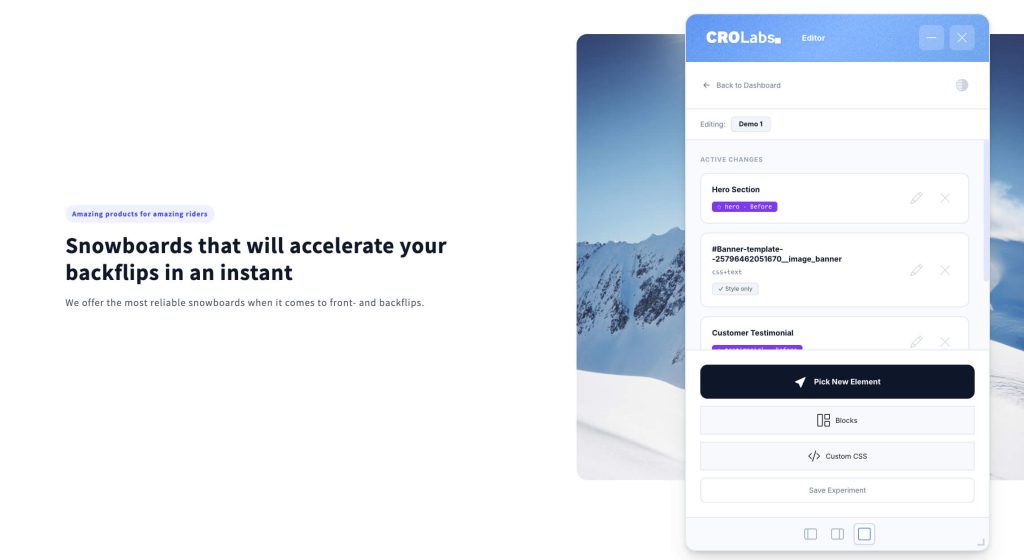
CROLabs does neither. The visual editor opens directly on top of your live website. Click the element you want to change, edit it in the sidebar, save.
No staging environment. No developer tickets. No waiting. Teams using the visual editor launch their first experiment in under 10 minutes.
No credit card required · Cancel anytime
From Experiment to Live Edit in One Click
Straight From Your Experiment to Your Live Site
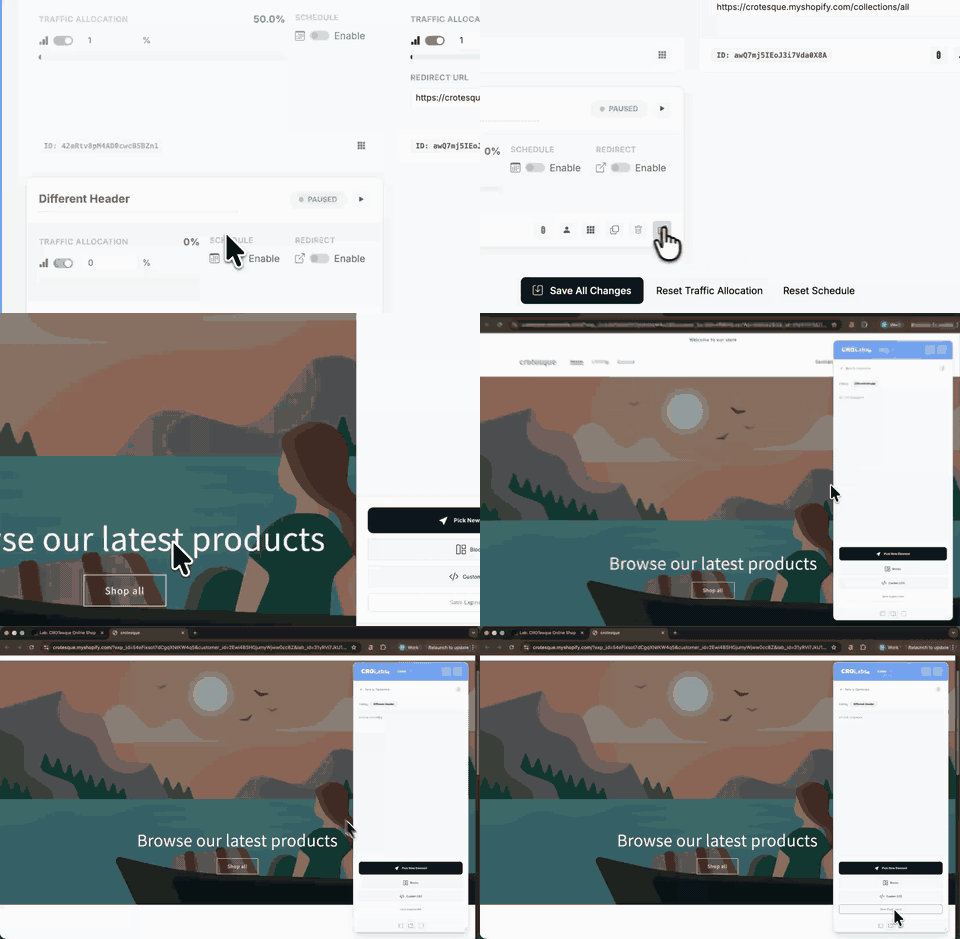
The visual editor lives inside your experiments. You don’t open it separately or navigate to a different tool.
Go to your Lab. Find the experiment. Click the editor button. Your actual website opens with the CROLabs editing layer on top. Real page. Real layout. Real content. Everything you change is applied as an overlay. Your codebase stays untouched.
This means you’re always editing what your visitors actually see. No “it looked different in staging” surprises.
Edit Any Element Without Code
Click Anything. Change Everything.
Once the editor is open, every element on your page is selectable.
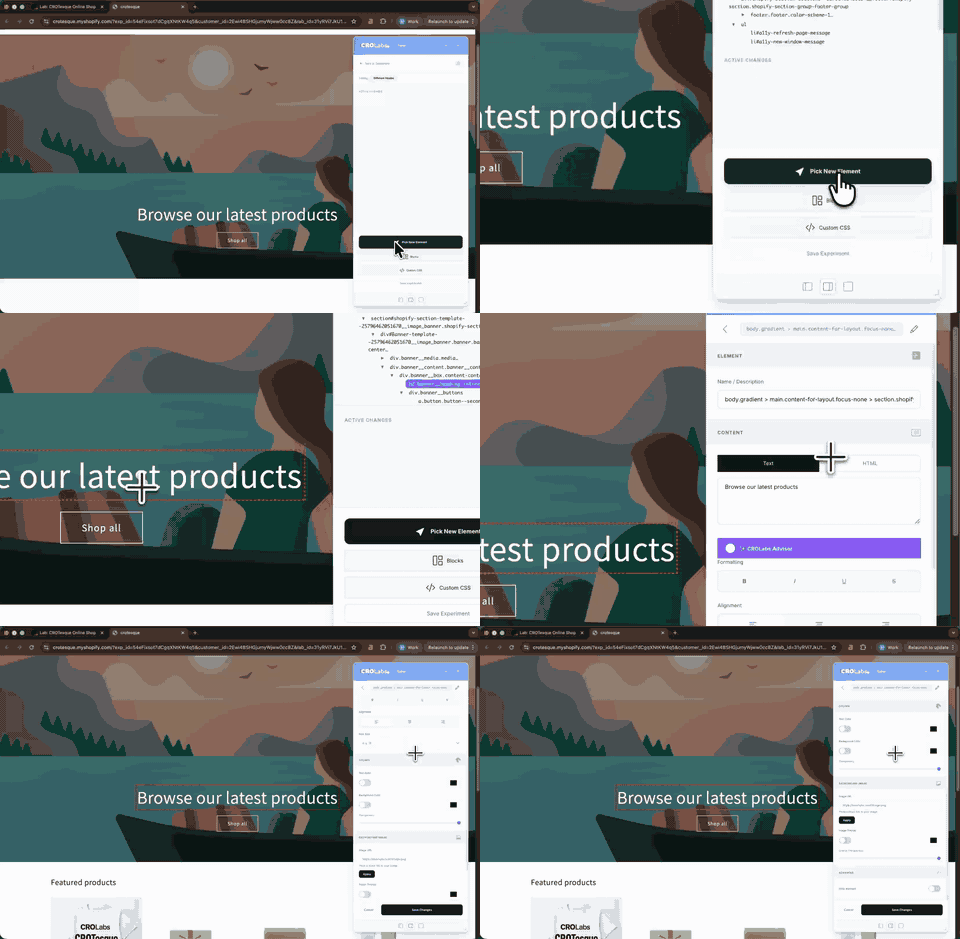
Click “Pick New Element.” Hover over the page. Elements highlight as you move. Click the one you want to edit. It appears in the sidebar with all editing options.
Name it clearly. “Hero Headline” is useful. “Element 3” is not. You’ll thank yourself three weeks from now.
Make your change. Save. Move on. Each edit is tracked separately in the sidebar, so you always see a clean list of everything that makes up your variant.
Code vs Click
How CROLabs Compares to Traditional Variant Building
Most A/B testing tools assume you have a developer available to build variants. That means tickets, staging environments, QA cycles, and weeks of waiting. CROLabs puts variant creation in the hands of the person who knows what to test.
| Traditional Variant Building | CROLabs Visual Editor | |
|---|---|---|
| Who builds it | Developer or agency | Marketer, directly |
| Where you edit | Staging environment or code editor | Your live site, real-time |
| Time to variant | Days to weeks | Minutes |
| Code required | HTML, CSS, or JavaScript | Zero |
| Preview accuracy | “It looked different in staging” | What you see is what visitors get |
| Codebase impact | Direct code changes or injections | Overlay only, codebase untouched |
| Rollback if test loses | Developer reverts the changes | Nothing to roll back |
Every week you spend waiting for a developer to build a variant is a week your winning test isn’t running.
Everything You Need to Build Winning Variants
Six Types of Edits, Zero Lines of Code
The simplicity of a WYSIWYG editor with the flexibility of an HTML visual editor. Change headlines, swap images, hide distractions, add sections. If a change could improve conversions, you can build and test it here.
Text.
Change the copy of any text element on the page. Apply formatting like bold, italic, underline, strikethrough, and custom text color. Need more control? Insert custom HTML directly in place of any text element.
Images.
Swap in a new image or hide an existing one. Test a different hero image, a different product photo, or remove a visual element that might be creating distraction.
Background color.
Change the background color of any element, set it to transparent, or hide it entirely. Good for testing button colors, section contrast, and visual hierarchy.
Visibility.
Hide or show any element on the page. Buttons, sections, banners, form fields. Hiding an element removes it from the variant without touching your actual page. Useful for testing what happens when you remove friction or distraction.
Custom CSS.
Add your own CSS to any element for changes that go beyond the standard options. Padding adjustments, font size tweaks, border radius changes. If the built-in options don't cover it, custom CSS will.
Custom blocks.
Drop in pre-built content blocks like hero sections or testimonial carousels. Add elements to your page that don't exist yet and test whether they move the needle. No developer needed to add a trust section above your CTA.
The Speed Advantage
Why the Visual Editor Changes How Fast You Can Test
Most teams wait 2-4 weeks between having a test idea and launching it. Developer availability, staging environments, QA cycles. By the time the variant goes live, the campaign has moved on.
With the CROLabs visual editor, the person who has the idea is the person who builds and launches the test. That cuts the cycle from weeks to minutes.
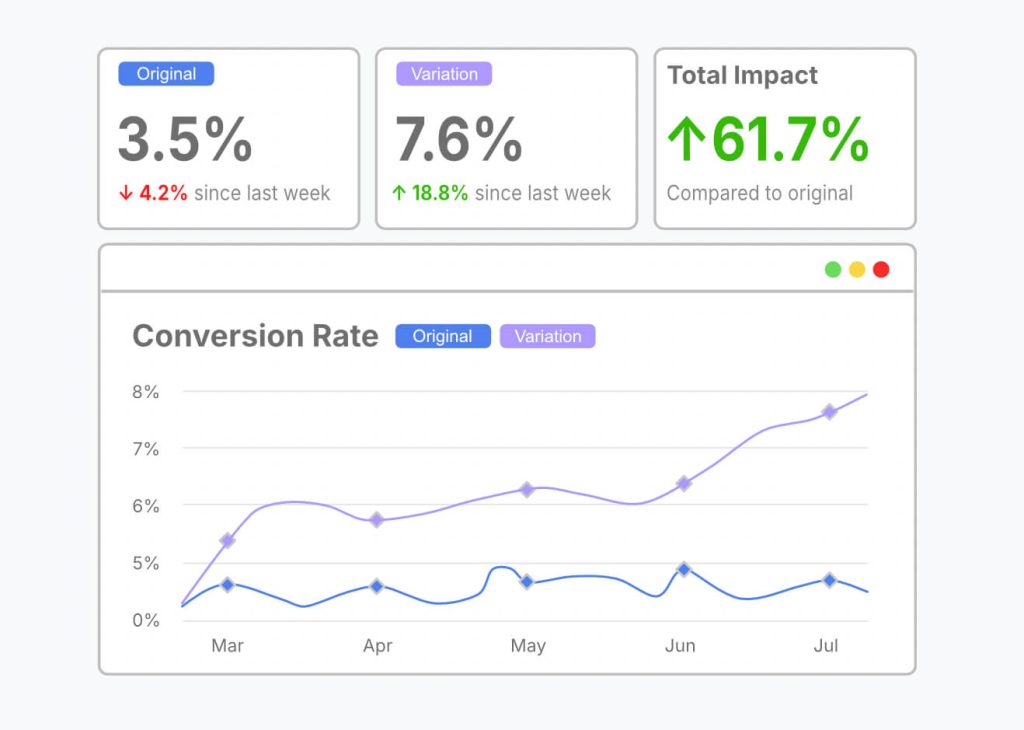
Under 10 minutes from idea to live experiment. No tickets, no sprints, no waiting.
3-5x more experiments per quarter. When launching a test takes minutes instead of weeks, you test more often. More tests means more learnings means more wins.
Higher cumulative uplift. Teams that test consistently see 20-30% higher conversion rates over 12 months. The visual editor is what makes “consistently” possible without developer dependency.
Zero impact on your codebase. Every change is an overlay. Your live site stays untouched. If a test loses, nothing needs to be rolled back.
AI-Powered Suggestions While You Edit
Not Sure What to Change? Let the AI Help.
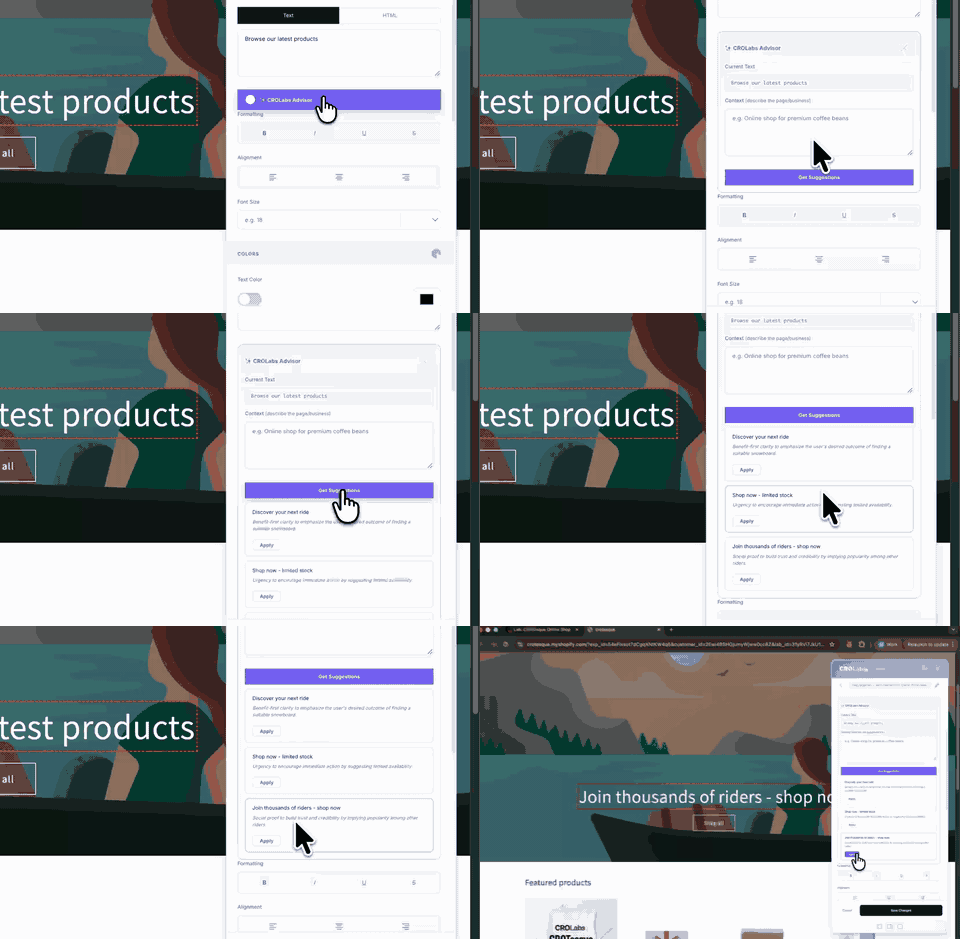
Staring at your page and not sure where to start? Select any element and ask the AI Advisor for a suggestion. One click, one credit, one specific recommendation for that exact element.
A better headline. A stronger CTA. A clearer value proposition. Based on CRO best practices, not generic advice.
Teams that combine AI suggestions with their own hypotheses build stronger variants and see higher win rates on their experiments.
Build Variants That Actually Win
Get Better Variants Out of the Editor
One change per variant for A/B tests. The whole point is knowing which change caused the result. Stack three edits into one variant and you learn nothing you can act on with confidence.
Name every element change. The sidebar lists everything. If it all says “Element 1” and “Element 2” you’ll lose track fast. Name them after what they actually are.
Preview before you launch. After saving, reopen the editor and check everything looks right. Desktop and mobile. What you see is what visitors get.
Use custom CSS when the standard options aren’t enough. A padding change, a font size tweak, a border adjustment. You don’t need a developer for that. The custom CSS field handles it.
Don’t Lose Your Work
Two Levels of Saving. Both Matter.
The visual editor has two save actions and they do different things.
Good habit: save each element as you go, then hit Save Experiment when you’re finished. Don’t rely on closing the browser to save anything.
Save Element Change
saves the edit you made to the currently selected element. Do this after every individual edit before moving to the next element. If you select a new element without saving, you risk losing what you just did.
Save Experiment
saves the entire variant including all element changes. Click this when you are done editing and ready to go back to the dashboard. If you close the editor without hitting Save Experiment, your individual element changes may not be preserved.

Built and Hosted in the EU
GDPR-Compliant by Default
CROLabs does not collect personally identifiable information. No names, no emails, no IP addresses. Built and hosted entirely in the EU. No US data transfers.
The visual editor works client-side. Changes are applied as overlays, not injected into your codebase. Search engines always see your original page. Your Core Web Vitals stay clean.
Testimonials
Your Words. Not Ours.

We switched from VWO because the pricing was getting out of hand. CROLabs does everything we need at a fraction of the cost, and the AI recommendations are something VWO never had.
Kleinfeldt & Thum Media

I signed up mainly for the A/B testing, but the AI Advisor is what kept me. It flagged conversion issues on my landing pages I'd been missing for months. Specific, prioritized, easy to act on. Two tests from the suggestions, both won. Impressed.
KC Malik Consulting & Development

Honestly I was skeptical about the AI recommendations but they've been surprisingly solid. It flagged stuff on our landing page that we'd been missing for months. Ran two tests from the suggestions and both won. Not bad for the first week.
CORE Marketing
Start Building Variants in Minutes. Free.
Sign up free and open the visual editor on your site. No credit card. No code. No developer. Just click, change, and test. Your first experiment can be live in under 10 minutes.
FAQ