Updated Oct 2026
If you’ve been looking into conversion rate optimization for a bit, you’ve probably run into both of these terms and noticed people use them a little differently depending on who’s talking.
Some tools treat A/B testing and redirect testing as basically the same thing while others treat them as two separate methods with their own use cases. Neither camp is wrong exactly, they’re just describing different parts of the same general idea: showing different versions of a page to different visitors and seeing which one performs better.
When you test a page, the way you deliver the variation matters. A small change to a headline can happen inside the page you already have. A completely new checkout experience may need its own page, its own URL, and a different testing setup.
That is where A/B testing and redirect testing start to diverge.
Both methods divide visitors between different experiences and compare how those experiences perform. The important distinction is how the variation is built and delivered. Once you understand that, choosing between them becomes much easier.
On This Page
What Is A/B Testing?
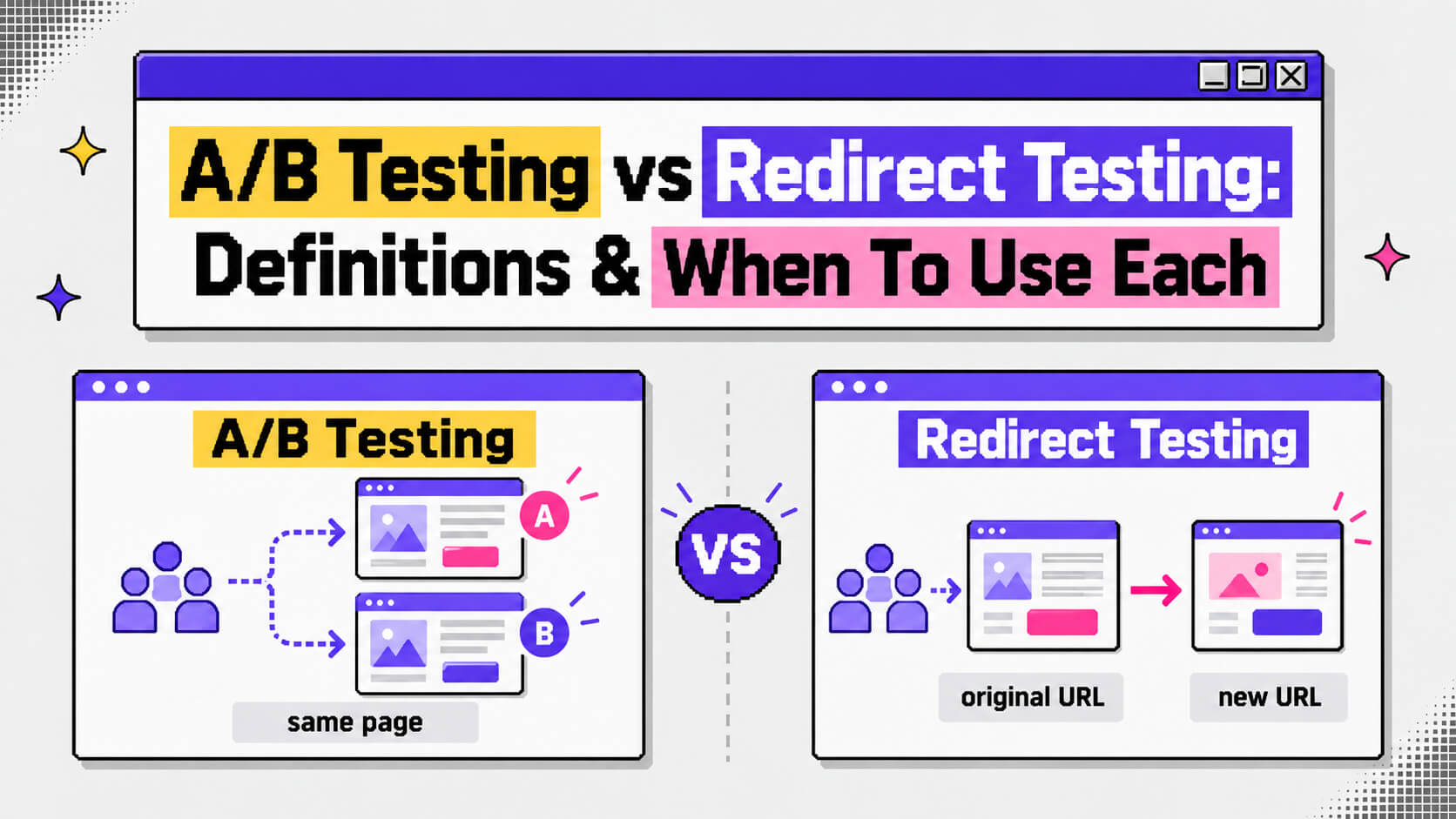
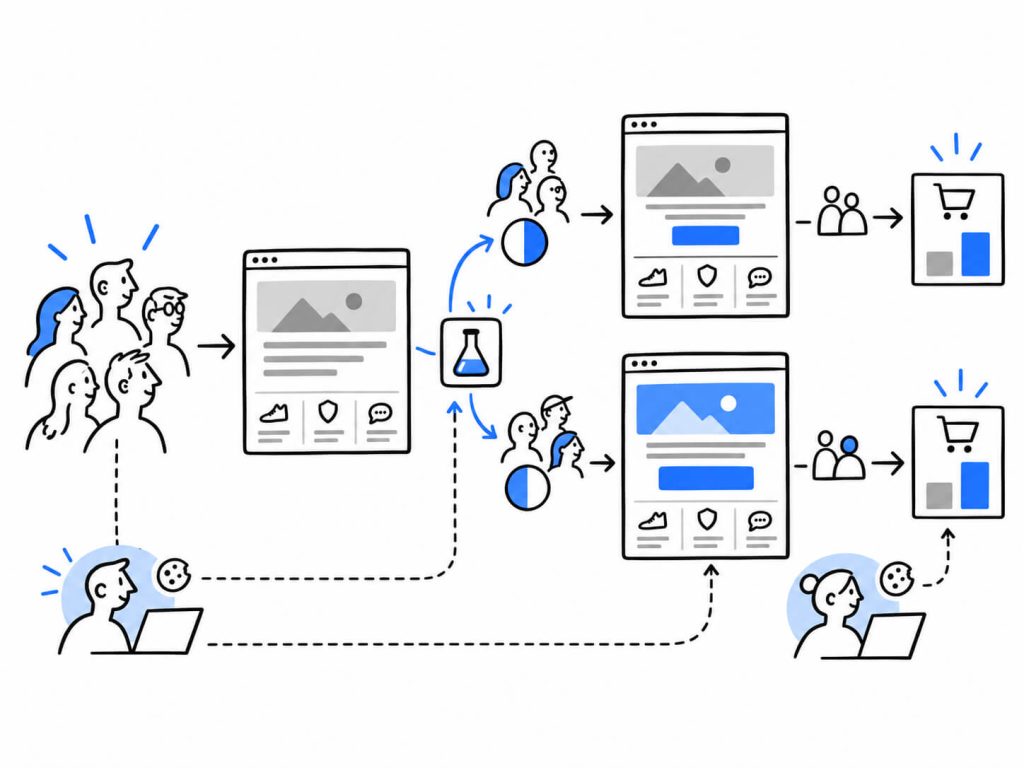
A/B testing, also called split testing, puts different versions of a page behind the same URL.
Suppose your pricing page lives at /pricing. You might keep the existing page for half of your visitors while showing the other half a version with a different headline, CTA, form, or layout. Everyone is still visiting /pricing though, but the experience can vary from one visitor to another.
In a/b testing, the testing platform handles the split and applies the variation when the page loads. In many cases, this happens through JavaScript.
This approach works well for changes that can be made within the existing page. Common examples include:
- A new headline or value proposition
- Different CTA copy or placement
- Fewer form fields
- A different hero image
- Changes to the pricing table
- A new testimonial or trust badge
For this kind of experiment, you usually don’t need someone to build an entirely new page. Tools such as CROLabs provide visual editors that let you modify page elements without writing the changes yourself.
A useful example comes from Arenaturist, a Croatian hotel and resort booking company. The company tested two arrangements for its booking engine, comparing a horizontal layout with a vertical one across its domains. The vertical version generated 119 transactions from 37,770 visits, while the horizontal version generated 87 transactions from 38,121 visits. The resulting conversion-rate lift was 52%.
The change itself was fairly contained. The underlying page remained intact while one important part of the experience changed.
That is where this type of testing makes sense. You can isolate a change, send traffic to both versions, and measure what happens.
Want to test page changes without rebuilding the page?
With CROLabs, you can create A/B test variations directly on your existing pages, split traffic between versions, and track which experience drives more conversions.
Cancel anytime.
What Is Redirect Testing?
Redirect testing, sometimes called split URL testing, takes a different approach.
Here, the two experiences live at different URLs.
Imagine your existing pricing page is /pricing. You could build a second version at /pricing-v2. Visitors initially arrive at the original URL, and the testing system assigns them to a test group. Visitors assigned to the variation are redirected to the second URL.
The visitor therefore loads a separate page rather than seeing a modified version of the original page.
That distinction becomes useful when you’re testing something substantial. A completely different page template can be difficult to recreate inside a visual editor. The same goes for a redesigned navigation system, a new checkout experience, or an onboarding flow that changes the way users move through the site.
In those situations, building the alternative page separately can be much cleaner.
A redirect test generally involves several moving parts:
- The alternative experience is built on its own URL.
- Visitors arriving at the original URL are divided between the control and variation.
- The testing system sends the relevant visitors to the variation URL.
- The assignment needs to persist so returning visitors continue seeing the same experience.
- Both versions need the same conversion tracking so the results can be compared properly.
That fourth point deserves attention. If the system doesn’t remember which version someone saw, the same person could see the control during one visit and the variation during another. Your data then becomes harder to interpret.

A less flashy but telling example is from the growth agency, SplitBase. SplitBase used this approach when working on landing pages for supplement brand NeuroMD. Rather than making a handful of edits to the existing page, the team tested substantially different formats, including advertorial-style and listicle pages, alongside a revised hero section. One variation produced a 55.3% lift over the original.
A test involving that level of structural change is a natural fit for separate URLs.
A/B Testing vs Redirect Testing
The distinction becomes easier to see when you look at how each method works in practice.
| A/B testing | Redirect testing | |
|---|---|---|
| URLs | Both experiences use the same URL | Each experience has its own URL |
| How the variation appears | The testing tool changes elements on the existing page | Visitors assigned to the variation are sent to another page |
| Typical setup | Visual editor or code injection | New page plus redirect configuration |
| Best for | Changes to individual elements or sections | Major redesigns, new templates, and different flows |
| Development needs | Often little or none | Usually requires development work |
| SEO considerations | Relatively straightforward because the URL stays the same | Requires careful handling of redirects and canonicalization |
The practical difference often comes down to the size of the experiment.
If you’re changing the CTA on an existing landing page, creating a second URL may add unnecessary work. If you’re replacing the entire landing page with a new experience, trying to reproduce that inside an A/B testing editor can become awkward.

The method should follow the experiment.
Not sure which pages or elements are worth testing?
CROLabs helps you identify CRO opportunities, create A/B test variations, and measure their impact from one place. Start with the changes you can test quickly, then work your way toward bigger experiments.
Cancel anytime.
Redirect Testing Has an SEO Side to It
Once a test involves multiple URLs, SEO needs to be part of the setup.
Google recommends using a temporary 302 redirect for experiments where visitors are temporarily sent from one URL to another. A 302 communicates that the redirect is temporary, which helps search engines continue treating the original URL as the primary page.
A 301 tells search engines that the move is permanent. That’s a different signal, and it isn’t appropriate for a temporary experiment that may end after a few weeks.
The variation page can also use a canonical tag pointing to the original URL. This gives search engines another indication that the test URL shouldn’t be treated as a separate page for indexing purposes.
These considerations don’t come up in the same way with a standard same-URL A/B test. There is only one public URL for the experience, so the experiment doesn’t create a second page that search engines need to interpret.
There is another practical consideration: don’t leave test variations hanging around indefinitely. Once an experiment has ended, clean up the temporary setup and decide what should happen to the variation URL.
When Should You Use A/B Testing?
A/B testing is usually the more convenient option when the page itself is staying largely intact.
For example, you might use it when you’re testing:
- A different headline
- CTA wording or placement
- The number of fields in a form
- A hero image
- Pricing presentation
- Social proof
- The order of existing page sections
It also makes sense when you want to launch an experiment without waiting for a new page to be designed and developed.
The key question is fairly simple: Can the variation be created by changing the existing page?
If the answer is yes, a standard A/B test will often be the more practical setup.
When Should You Use Redirect Testing?
Redirect testing starts to make more sense when the experience itself needs to be rebuilt.
You might choose it for:
- A completely redesigned landing page
- A new page template
- A different navigation structure
- A new checkout process
- A substantially different onboarding flow
- A different form experience
- A page that needs to be built independently from the existing version
Consider a checkout experiment where one version uses the current single-page checkout and another uses a multi-step flow. Recreating the entire second experience inside a visual editor may be difficult, particularly if the underlying functionality is different.
A separate page gives the development team room to build the experience properly.
Some teams also use the two approaches at different stages of the same optimization project. A redirect test can be used to compare two substantially different page experiences. Once one has been selected, smaller A/B tests can explore the details within that experience.
Why “Split Testing” Can Be Confusing
You may also come across the term split testing, which adds another layer of confusion.
In some CRO platforms, the term refers specifically to testing different URLs. In other contexts, people use “split test” as a general term for dividing an audience between two versions of something.
That second use isn’t limited to websites, either. A paid media team might describe an experiment comparing two ad creatives as a split test.
So when you’re evaluating a CRO platform, don’t rely on the terminology alone. Look at the actual testing capabilities.
If you need to test separate URLs, the platform needs to support redirect or split-URL experiments. If you’re planning to modify elements on an existing page, you’ll want an editor or another way to inject the variations.
Many CRO platforms support both approaches, but the terminology used on their websites can vary.
One Technical Detail: Sample Ratio Mismatch
Redirect tests also introduce a technical issue that’s worth understanding: sample ratio mismatch.
A testing system might intend to send 50% of visitors to each experience, yet the traffic ends up distributed differently. There are several possible reasons for this, including problems with redirects, tracking, or visitor assignment.
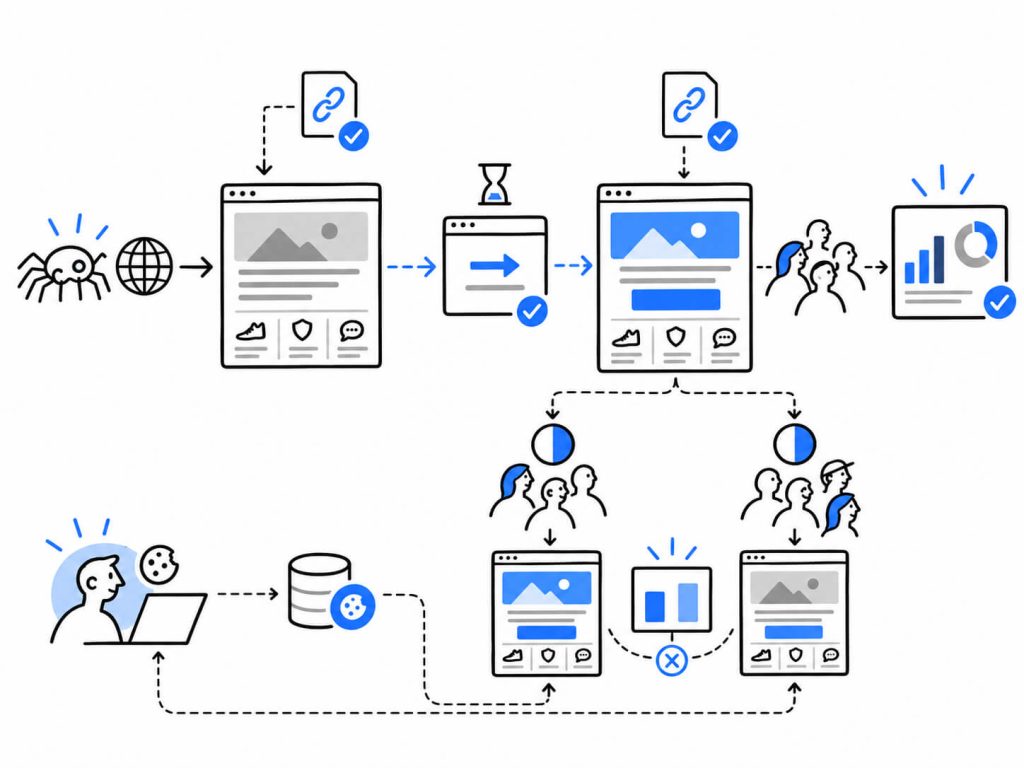
Returning visitors can create another problem if their original assignment isn’t stored. Someone who saw version A yesterday could be sent to version B today. That makes it harder to know which experience influenced their eventual conversion.
Persistent assignment, usually handled through a cookie or stored visitor ID, helps keep people in the same test group across sessions.
This matters for both the quality of the experiment and your confidence in its results. Before judging the performance of a redirect test, check that the traffic split and visitor assignment are working as intended.
Conclusion
Can You Run Both Types of Tests? Yes, but the experiments need to be planned carefully.
Running two tests that change the same part of a page at the same time makes it difficult to attribute the result to either experiment. The tests can interfere with each other and produce data that doesn’t tell you much about either one.
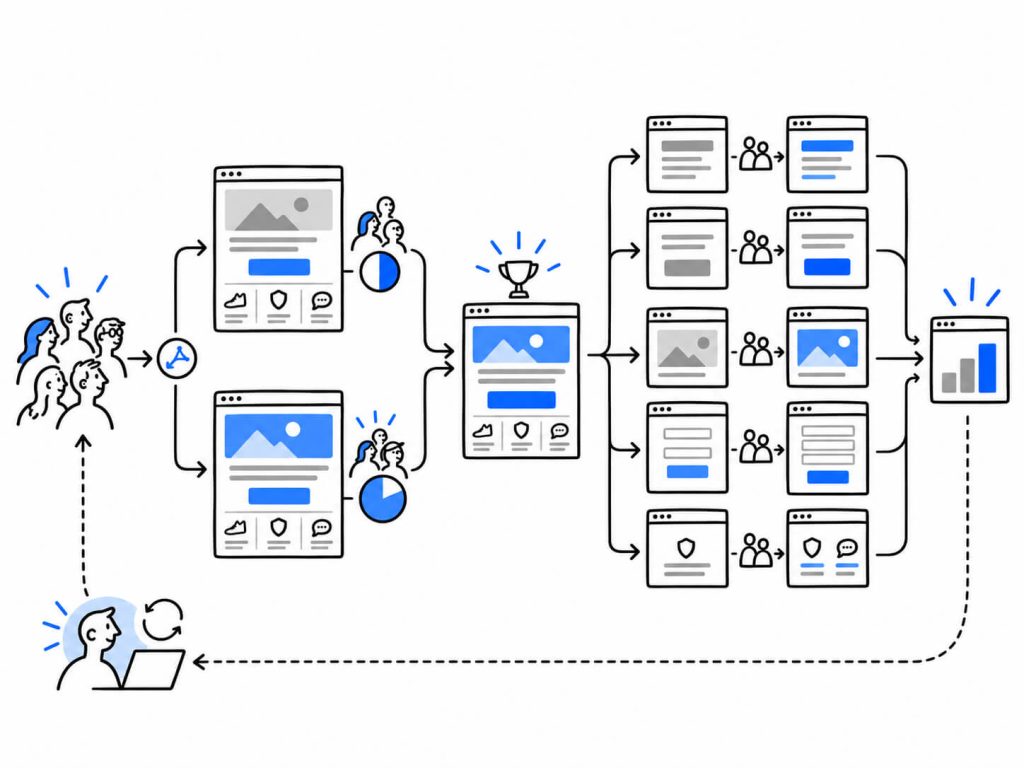
A more sensible sequence might look like this:
You first use redirect testing to compare two substantially different landing pages. Once you have enough data and choose the page experience you want to keep, you can run A/B tests on individual elements within that page.
For example, the second stage could test different CTA wording or hero images. This gives each experiment a clear job.
To get started on the A/B test, try CROLabs. CROLabs’ A/B testing feature handles same-URL changes without needing a developer, and its CRO Advisor can help you figure out which pages are worth testing in the first place, before you decide whether that test needs its own URL.
Run your next A/B test for free
CROLabs makes same-URL A/B testing easier, so you can test headlines, CTAs, forms, layouts, and other page elements without waiting on a developer. Use CRO Advisor to find testing opportunities and turn them into experiments.
Cancel anytime.
Frequently Asked Questions
Is redirect testing a type of A/B testing?
It can be.
Both approaches use the same basic experimental principle: visitors are assigned to different experiences and the resulting conversion behavior is compared. The distinction comes from how the variation is delivered.
Some people use “A/B testing” as the broad term for this entire category of experiments. Others use it specifically for same-URL tests and treat redirect testing as a separate method. Both terms appear in CRO software and marketing discussions, so it’s worth checking how a particular platform defines them.
Does redirect testing hurt SEO?
A properly configured redirect test shouldn’t create an SEO problem.
Google recommends a 302 redirect for temporary experiments rather than a 301. The variation can also use a canonical pointing to the original URL. Once the experiment ends, remove the temporary setup and handle the variation URL appropriately.
The bigger SEO risks come from treating a temporary experiment like a permanent site migration or leaving test URLs active long after the experiment has finished.
How long should an A/B or redirect test run?
There isn’t a universal number of days.
The amount of time you need depends on factors such as your traffic volume, baseline conversion rate, and the size of the difference you’re trying to detect. A page with a small amount of traffic may need considerably longer to collect enough observations than a high-traffic page.
It’s also important to avoid stopping a test simply because one variation happens to be ahead early on. Early results can move considerably as more visitors enter the experiment.
Can I run an A/B test and a redirect test on the same page?
You can use both methods as part of the same optimization program, but running overlapping experiments requires care.
For example, you could use a redirect test to compare two complete page designs and then run A/B tests on individual elements of the design you continue with.
Running simultaneous experiments that modify the same parts of the experience makes the resulting data much harder to interpret.
Do I need a developer for redirect testing?
Usually, yes.
Someone needs to build the variation page, publish it, and configure the technical side of the redirect. The exact amount of development work depends on what you’re testing and how your site is built.
Once the pages are ready, the CRO platform can generally handle the visitor split and experiment tracking.
CROLabs supports A/B testing for changes made directly to an existing page, so teams can create variations without rebuilding the page from scratch. Its CRO Advisor can also help identify pages and opportunities worth testing before you decide how to structure the experiment.