On This Page
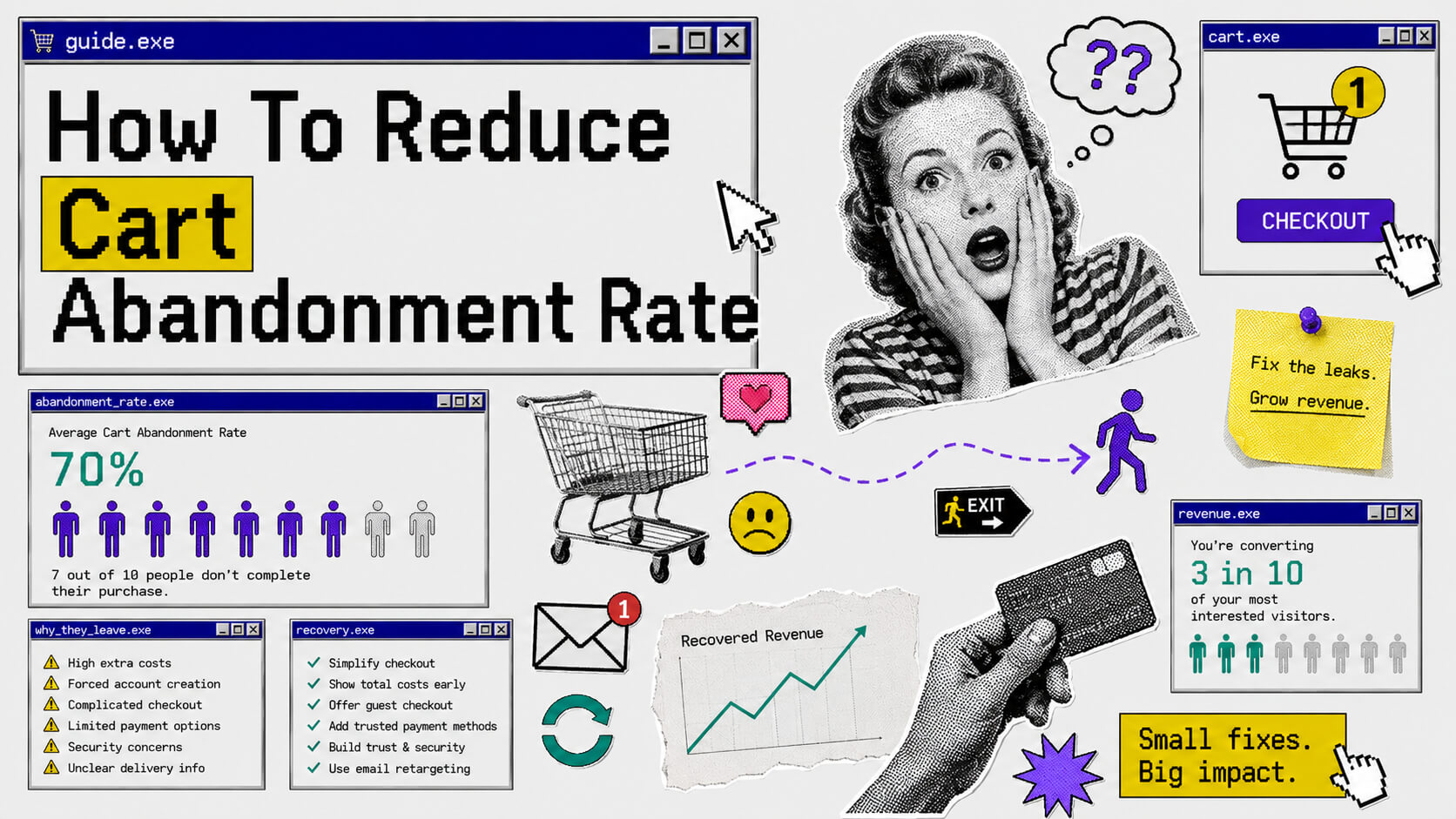
Your store did the hard work of attracting potential customers (big win!), and after browsing your products and adding something to cart (another big win!), they left without buying (??).
If you’re running an e-commerce store, this is cart abandonment and it’s happening to you right now, at scale. The average cart abandonment rate across e-commerce is around 70%. That means roughly 7 out of every 10 people who show enough interest to add something to their cart never complete the purchase.
You’re converting 3 in 10 of your most interested visitors.
The good news is that cart abandonment is one of the most fixable problems in e-commerce. Unlike attracting new traffic (which costs money and takes time), the people abandoning your cart are already there. They already want what you’re selling. Something in the experience stopped them.
This guide breaks down exactly why that happens and, more importantly, what you can do about it.
What Is Cart Abandonment?
Cart abandonment happens when a shopper adds items to their online shopping cart but exits without completing the purchase.
The cart abandonment rate is calculated like this:
Cart Abandonment Rate = (1 - (Completed Purchases ÷ Cart Initiations)) × 100So if 1,000 people add something to their cart (i.e cart initiations) and only 300 complete checkout, your cart abandonment rate is:
(1 - (300 ÷ 1000)) x 100 = (1 - 0.3) x 100 = 0.7 x 100 = 70%Related to this, but slightly different, is checkout abandonment, which is specifically when someone starts the checkout process (enters their details, clicks “proceed to payment”) but still doesn’t finish. Both matter, and both need to be tracked separately because the fixes are often different.
Why Cart Abandonment Is Worth Fixing
Here’s a quick example to show what’s actually at stake.
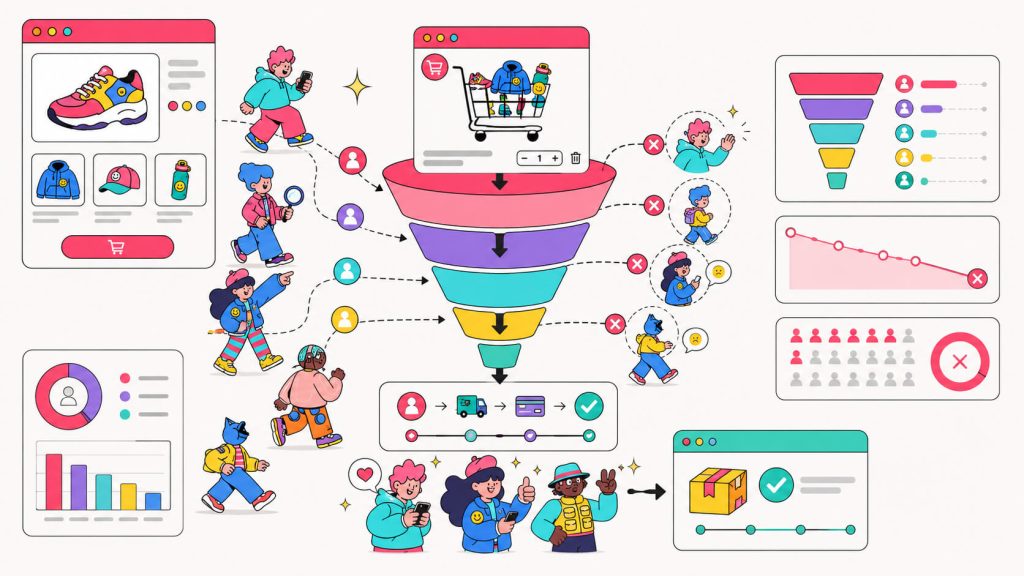
Say your store gets 10,000 visitors a month. 15% add something to their cart, so that’s 1,500 cart initiations. With a 70% abandonment rate, you’re getting 450 completed purchases. If your average order value is $60, that’s $27,000 a month.
Now, what if you cut your abandonment rate from 70% to 60%? That’s 600 completed purchases instead of 450. At $60 AOV, you’re now making $36,000 a month. The same traffic, same ads budget, same products but a better checkout experience. That’s an extra $9,000 a month, or $108,000 a year, from fixing something that’s already broken.
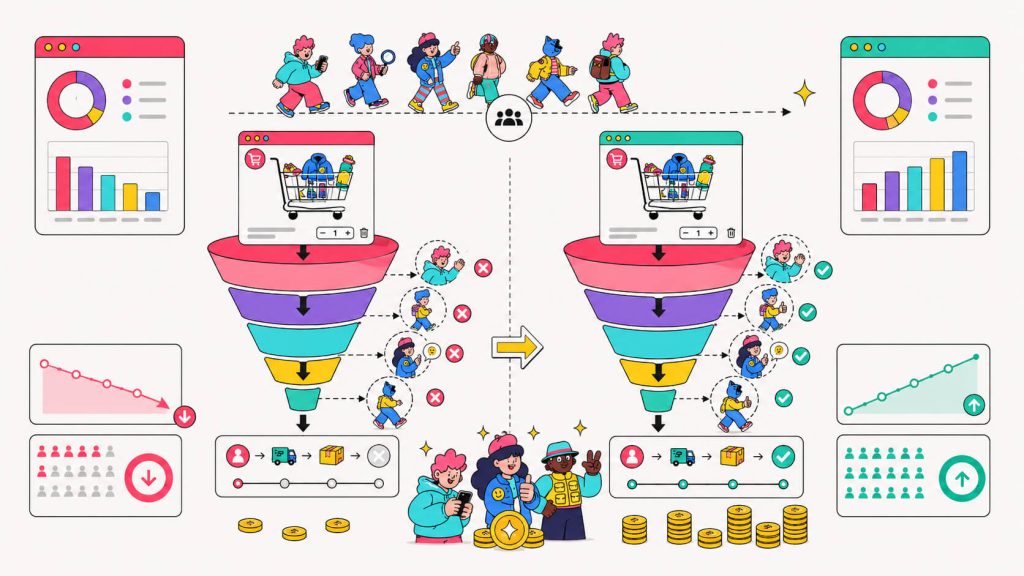
Every Abandoned Cart Tells a Story
Discover what’s stopping customers from completing their purchase and test your way to higher conversions.
Why Do People Actually Abandon Their Cart?
Before you start fixing things, you need to understand what’s causing the problem in the first place. Here are the most common reasons:
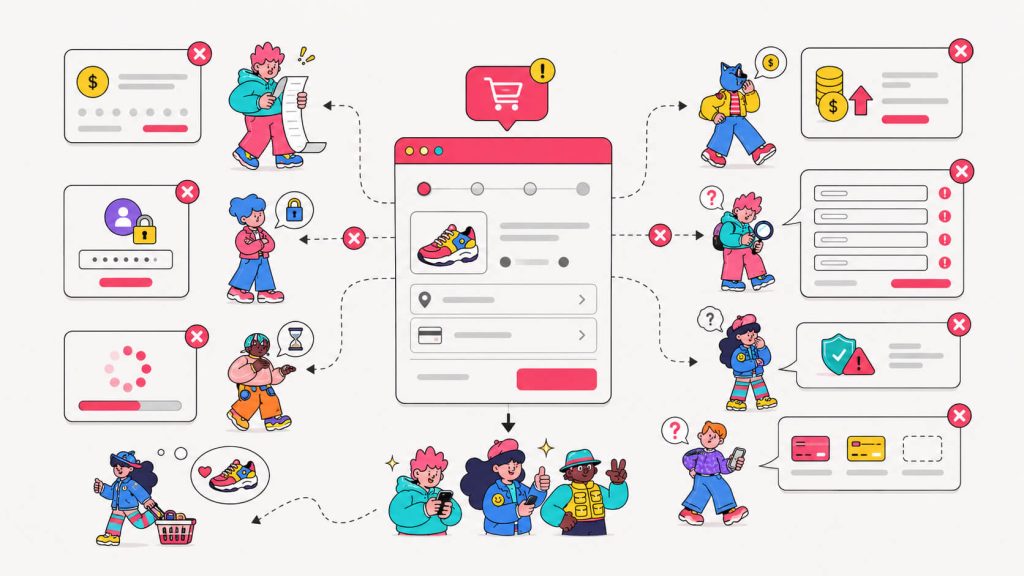
- Unexpected costs: Shipping fees, taxes, or service charges that only show up at checkout. This is the number one reason. Nobody likes a $12 item turning into $27 at the last step.
- Being forced to create an account: Someone just wants to buy one thing. Making them sign up first is friction.
- A complicated checkout process: Too many steps, too many form fields, or a confusing page layout.
- Slow page speed: A checkout page that takes more than 3 seconds to load loses a significant percentage of users. On mobile, it’s even worse.
- Lack of trust signals: No visible security badges, no return policy, no reviews near the checkout. Basically no evidence that the store is legitimate.
- Limited payment options: Only accepting one or two payment methods excludes a chunk of buyers who prefer alternatives like PayPal, Apple Pay, or buy-now-pay-later.
- “Just browsing”: Some people add to cart as a wishlist. They were never going to buy that session. You can still win them back, but they need a different approach.
The tricky part is that your specific abandonment problem might be one of these or a combination of a few. And unless you know which one is actually causing the drop-off on your store, you’re just guessing.
7 Ways To Reduce Your Cart Abandonment Rate
We’ve seen the possible reasons shoppers abandon carts but do you know the exact reason YOUR shoppers abandon their cart?
Before Anything:
You need visibility. Don’t assume you know the problem and jump straight to implementing solutions.
Is the drop-off happening on your product page before they even add to cart? On the cart page after they see the total? During checkout, after they’ve entered their email? Or is it something on mobile that’s different from desktop?.
Each scenario points to a different fix. Removing form fields in checkout won’t help if most people abandon the product page because the images are poor. Adding trust badges won’t matter if your real problem is site speed.
To get the exact scenario, use a conversion rate optimization tool (that’s us! 👋). They give you a clear picture of your customer journey so you can see the exact drop-off points.
See Where Customers Abandon Their Cart
CROLabs shows you exactly where visitors drop off so you can focus on fixes that work.
Ok, let’s get to it.
1. Be Transparent About Costs From The Start
Unexpected costs are the number one reason people abandon carts. The fix is simply showing the full cost earlier.
If you charge for shipping or there are taxes, make these clear before checkout. The goal is to make sure there are no surprises at the payment step, because that’s where the damage happens.
Some specific things to implement:
- Add a shipping cost estimator to your cart page (they enter their zip code and see the cost before proceeding)
- Show a cost breakdown (subtotal, shipping, taxes) on the cart page, not just at the final checkout step
- If you offer free shipping above a threshold, display it prominently: “Add $12 more to qualify for free shipping”
- Consider building your shipping cost into your product price if you can. “Free shipping” outperforms “we added shipping in checkout” almost every time
2. Simplify Your Checkout Process
Unnecessary extra steps in your checkout just add friction.
Some high-impact simplifications:
- Offer guest checkout: Let people buy without creating an account. You can invite them to create one after purchase.
- Reduce form fields: Only ask for what you actually need. “Phone number” as a required field costs you more sales than it saves in logistics.
- Use address autocomplete: Tools like Google Address Autocomplete reduce typing and error rates at the address step.
- One-page checkout: Where possible, condense everything into one page instead of multiple steps. Less clicking, fewer opportunities to leave.
- Save cart contents: If someone leaves and comes back, their cart should still be there. Don’t make them start over.
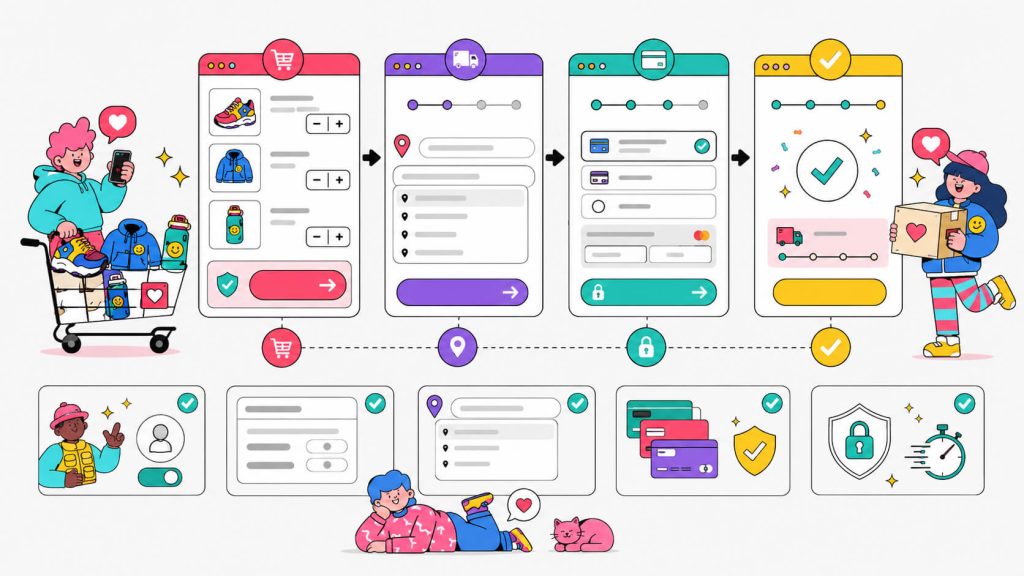
3. Build Trust At The Right Moments
Cart abandonment often isn’t about the product. It’s about trust. People get cold feet before they hand over their credit card, especially if it’s their first purchase from your store.
You need to place trust signals at the exact moments where doubt tends to creep in:
- Security badges near the payment fields: SSL certificate indicators, “Secure Checkout” labels, recognized payment processor logos (Visa, Mastercard, PayPal, Stripe).
- Return policy visible in checkout: Don’t make them leave the checkout flow to find it. A one-liner like “Free 30-day returns” near the CTA does a lot of work.
- Reviews near the checkout page: A testimonial or star rating visible as they complete their purchase reinforces that this decision is a good one.
- Phone number or live chat access: Knowing a real person is reachable if something goes wrong increases purchase confidence significantly.
4. Optimize Your Product Pages (Don’t Wait Until Checkout)
A lot of businesses treat cart abandonment as a checkout problem. But frequently, the real issue is on the product page.
If someone adds to cart and immediately abandons, the product page probably created doubt. Maybe the images weren’t good enough or the description didn’t answer a key question or the price felt unjustified because there was no context around it. This is why the behavioral analytics step matters so much, it tells you if the product page is where you’re losing people.
Common product page fixes that reduce downstream abandonment:
- High-quality images from multiple angles, including lifestyle/in-context shots
- Clear, specific product descriptions that answer the questions your customers actually have (size, material, compatibility, use case)
- Visible reviews and ratings on the product page itself
- Urgency where it’s real: “Only 3 left in stock” or “Ships by tomorrow if you order in the next 2 hours”
- Clear and visible CTA buttons. Not just “Add to Cart” but prominent, above the fold, unmissable
Pro Tip: You can test which one of these fixes works best for you using CROLabs’ experimentation feature.
5. Use Exit-Intent And On-Site Recovery
Some people are going to try to leave your cart or checkout page. Exit-intent tools detect when a visitor’s cursor moves toward closing the tab and trigger a targeted message before they go.
What works here:
- A discount offer: “Wait — here’s 10% off your order” (use sparingly; train your audience to expect discounts and you’ll erode margin)
- A reminder of their cart contents: “You left something behind” with a product image
- A value reminder: “Free returns. Free shipping over $50. Easy checkout”. This addresses their likely objection directly
- A simpler ask: “Enter your email and we’ll save your cart” captures leads even from non-buyers
6. Send Cart Abandonment Emails (And Make Them Good)
If you captured someone’s email, either because they started checkout or because you’ve got an exit-intent popup, you have a second chance.
Cart abandonment email sequences consistently rank as one of the highest-ROI activities in e-commerce. Here’s what a solid sequence looks like:
- Email 1 (1 hour after abandonment): A simple reminder. No pressure. “You left something in your cart” with a photo of the product and a direct link back to checkout.
- Email 2 (24 hours after abandonment): Address a likely objection. Highlight your return policy, security, or reviews. Maybe answer an FAQ they might have.
- Email 3 (72 hours after abandonment): Create urgency or offer an incentive. “Your cart expires soon” or a small discount code if your margins allow.
Keep the emails short. A product image, a one-liner, and a big obvious button back to checkout.
7. Expand Your Payment Options
This one is often underestimated. If someone gets to the payment step and their preferred method isn’t available, they just leave.
At a minimum:
- Accept major credit and debit cards
- Offer PayPal (it’s a trust signal as much as a payment method)
- Add Apple Pay and Google Pay for mobile users (removes the friction of typing card details on a phone)
- Consider buy-now-pay-later options (Klarna, Afterpay, etc.) especially if your AOV is over $100
Tools That Help You Automate Cart Recovery
There are marketing tools that you should add to your stack to help you reduce cart abandonment rate and make the process faster.
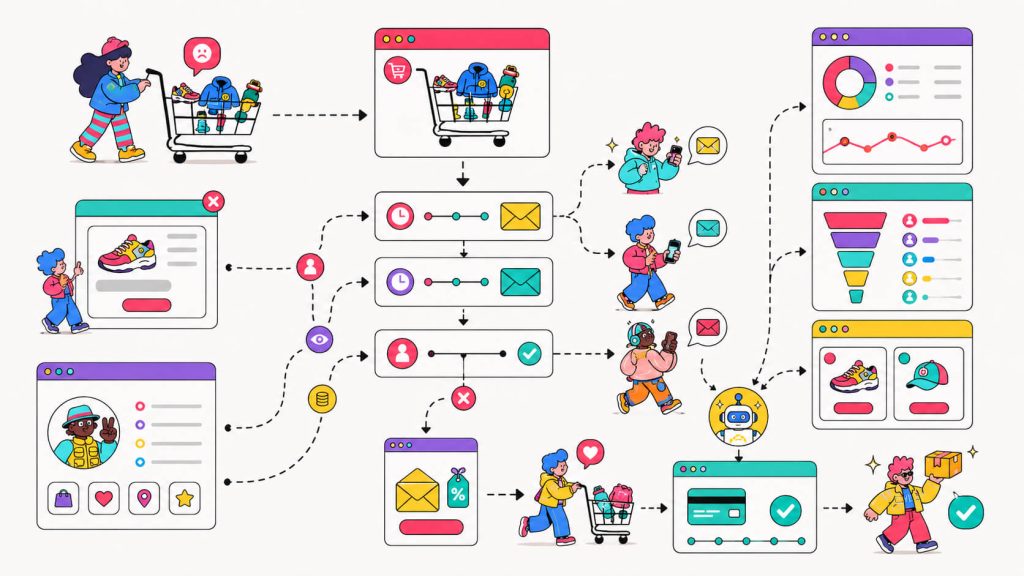
a) CRO tools → Example: CROLabs
Conversion rate optimization tools are used to improve conversion rate, and they give you insight into how your customers/visitors behave on your website. You can use these to see where your customers drop off and what exactly is contributing to your high cart abandonment rate.
b) Email marketing tools → Example: Omnisend
You can launch cart recovery email (and sometimes SMS) campaigns with these.
c) CRM tools → Example: HubSpot
These collect and manage your customers’ data.
Conclusion
Those 7 out of 10 people who abandoned? They were interested enough to add something to their cart. They didn’t need to be convinced the product exists or that they might want it, but something in the experience stopped them.
That something is fixable.Start by understanding where the drop-off is actually happening. CROLabs is built to make this process fast and accessible. You get the behavioral analytics to find the problem and the A/B testing to fix it.
Stop guessing why shoppers leave
Frequently Asked Questions
What is a good cart abandonment rate?
The average across e-commerce is around 70%. If you’re below 65%, you’re doing better than most. If you’re consistently above 75%, there’s likely a significant friction point in your checkout.
Why is my cart abandonment rate so high?
The honest answer is: you need to check. High abandonment usually points to one of three things : unexpected costs at checkout, a friction-heavy purchase process, or trust issues. But which of these is your problem (or if it’s all three) requires looking at the actual behavioral data from your store, not guessing (Psst, CROLabs helps with this).
How do cart abandonment emails work?
They’re triggered emails sent to shoppers who started checkout or added to cart without completing the purchase. They require capturing an email before the abandonment happens, either through a required checkout field, a pre-checkout email capture, or an exit-intent popup. A good sequence is 3 emails over 72 hours: a reminder, an objection-handler, and a final nudge.
Does free shipping actually reduce cart abandonment?
Often, yes… but not always. Unexpected shipping costs are the top reason for abandonment, so eliminating them helps. But if your product pages are weak or your checkout process has other friction points, free shipping alone won’t fix the rate. Address the whole experience, not just the cost.
How do I track cart abandonment?
Most e-commerce platforms (Shopify, WooCommerce, etc.) have some built-in tracking. For deeper insight , specifically where on your checkout or product pages people are dropping off, not just that they dropped off , use a behavioral analytics tool like CROLabs.
How long does it take to reduce cart abandonment?
Quick wins (fixing a broken mobile checkout, removing a forced account creation, adding shipping transparency) can show results in days. More structural improvements take longer. If you’re running proper A/B tests, expect a minimum of 1-2 weeks to get statistically significant results, depending on your traffic volume.