Updated Oct 2026
Companies that personalize the customer experience generate roughly 40% more revenue than companies that treat every visitor the same.
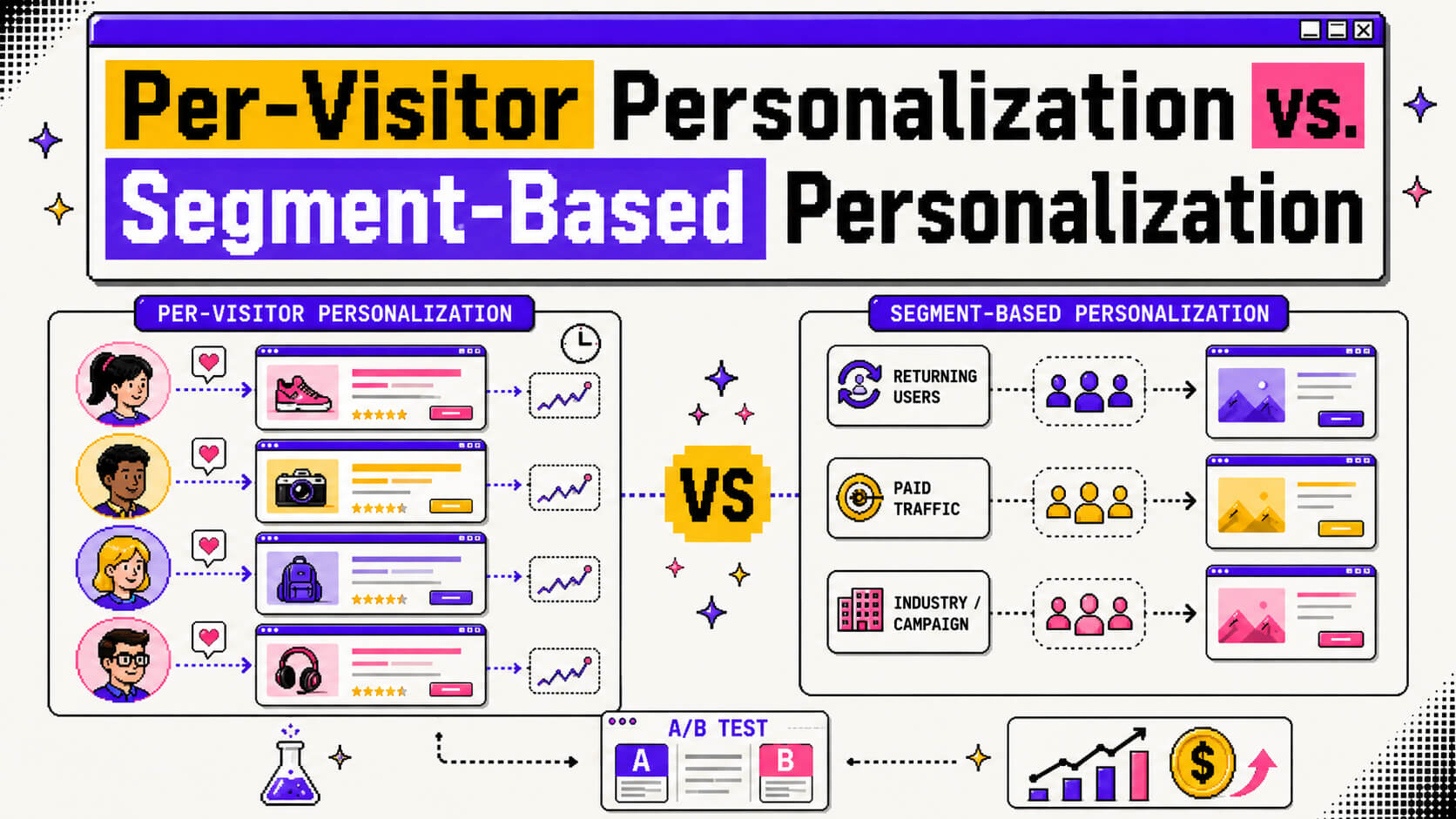
Right now, most teams already accept that personalization works, the harder question is which kind to build. Do you tailor the page for each individual visitor by adjusting content in real time based on their own behavior? Or do you group visitors into segments, say “returning trial users” or “paid traffic from a healthcare campaign”, and design a set number of experiences for those groups? Both fall under the broader idea of website personalization and lean on segmentation somewhere in the process. They both also need to be validated with real experimentation before you trust the results.
In this article, we’ll look at per-visitor personalization and segment-based personalization side by side. We’ll break down how they differ, when each one earns its keep, and how a/b testing ties both of them together.
On This Page
Per-visitor Personalization and Segment-based Personalization: What’s The Difference?
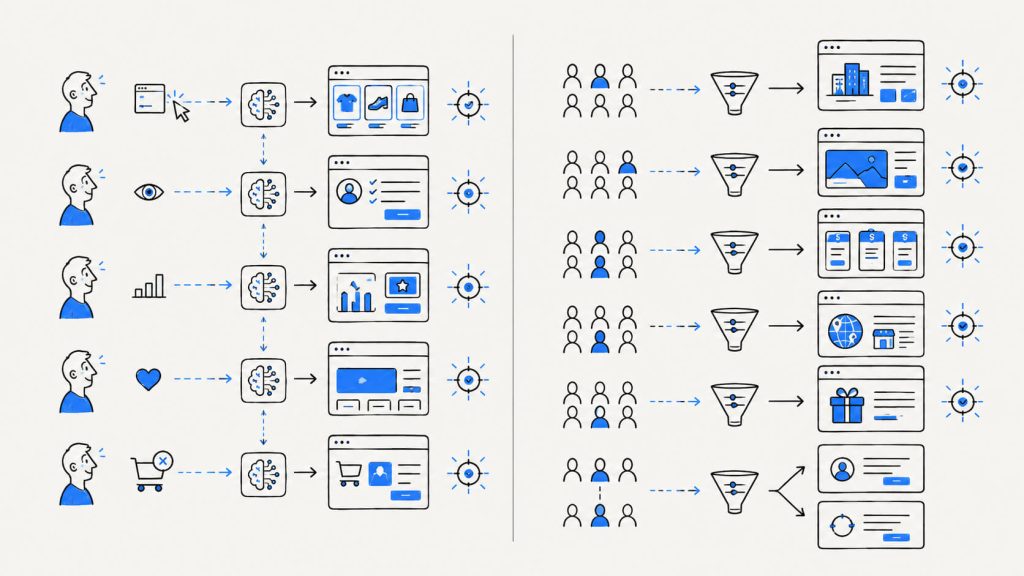
Segment-based personalization groups visitors by shared traits. These shared traits could be
- traffic source
- device
- industry
- company size
- region
- on-site behavior, etc.
In segment-based personalization, a team builds a handful of page variants (maybe five, maybe fifteen) and routes each visitor into whichever one matches their group.
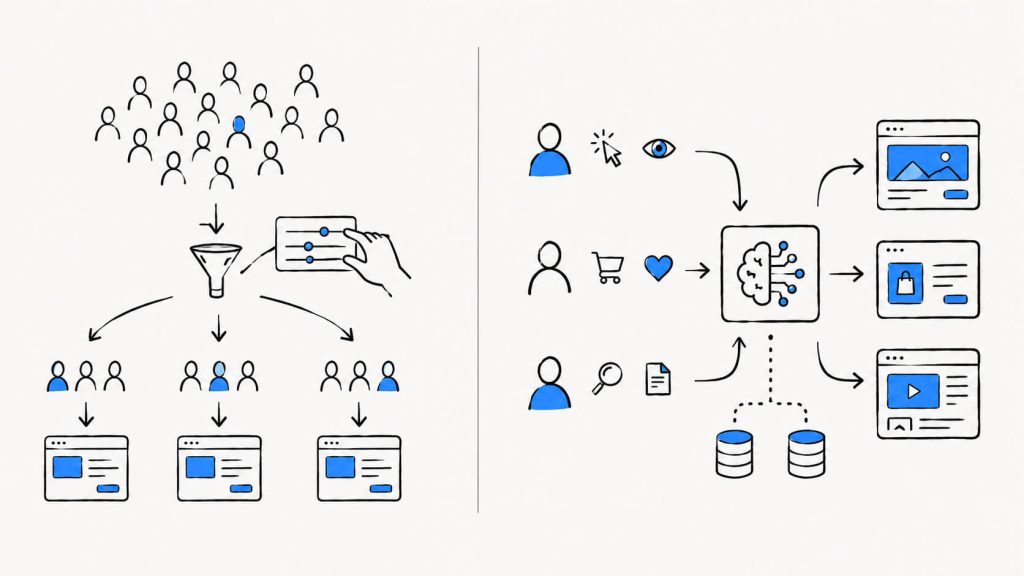
You can group based on one or more of the shared traits. For example, if you segment based on both traffic source and company size, you can have visitors that fall under “enterprise buyers from LinkedIn”. Everyone who lands in this “enterprise buyers from LinkedIn” segment sees the same dynamic content, same headline, and the same CTA.
Per-visitor personalization, or individualization, skips the group entirely and looks at the individual. It pulls in
- browsing history
- past purchases
- session behavior
- referral source
- the time of day someone shows up, etc
and adjusts the experience for that one person specifically.
| Segment-Based Personalization | Per-Visitor Personalization | |
|---|---|---|
| Who it targets | A group of visitors sharing a trait | One specific visitor |
| Who decides the rule | A person on the marketing or CRO team | An algorithm, based on live signals |
| Data required | A few data points per group (source, device, industry) | Ongoing behavioral history per visitor |
| Traffic needed to work well | Works on lower-traffic sites | Needs consistent, higher-volume traffic |
| Number of experiences | A fixed set (five, ten, fifteen variants) | Effectively unlimited, one per visitor |
| Control over messaging | High, a human writes and approves each variant | Lower, the system generates the match |
| Setup effort | Faster to launch | Takes longer to build and train |
| Best fit | Newer sites, regulated industries, message match | High-traffic sites with rich behavioral data |
| Example | A healthcare-specific landing page for a LinkedIn ad segment | Netflix’s homepage, unique to each account |
The line between the two gets fuzzy sometimes, since a lot of per-visitor systems are technically running thousands of narrow micro-segments behind the scenes. For a marketing or CRO team, though, the practical difference comes down to control and scale.
With segmentation, a person decides the rule: if a visitor came from this campaign, show this hero image. With per-visitor personalization, an algorithm makes that call, weighing far more signals than any human would think to test by hand.
You can segment and personalized based on anything really. However, segmentation and per-visitor personalization both still need a testing layer to confirm the experience you’re showing actually beats a plain control.
Not sure which personalization approach fits your site?
You don’t need to jump straight into per-visitor personalization. Start with the approach that matches your traffic, data, and goals.
Cancel anytime.
Why Is Per-visitor Personalization Important?
Product recommendations built around an individual shopper’s behavior convert 288% better than generic suggestions shown to everyone. That figure represents the upper end of what per-visitor personalization can achieve once the underlying data is clean and the model has enough history to work with.
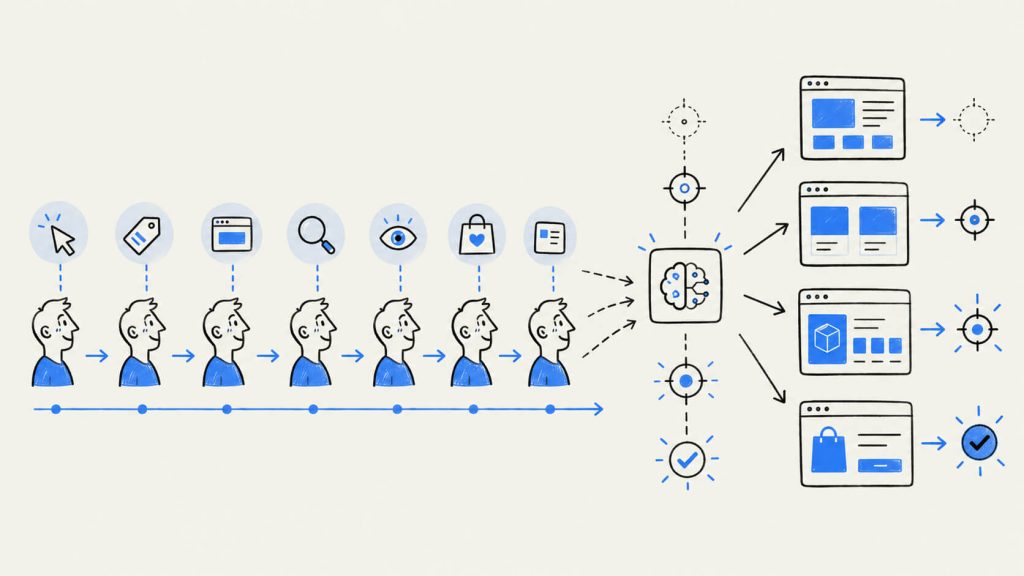
A few reasons per-visitor personalization is important, especially in a CRO program, are:
a. It Delivers Precision Segmentation Can’t Match
Instead of asking what the average buyer wants, you’re asking what this specific person wants right now, based on their last few sessions.
If you have a visitor who has already checked your pricing page twice this week, then they don’t need to see another top-of-funnel explainer. With per-visitor personalization, you can show them a comparison chart or a relevant case study or even a direct line to a demo call, all of which will serve them better.
b. It Gets Sharper the More Data It Collects
The more page views, clicks, and return visits a system collects on someone, the sharper its predictions get. A person’s tenth session with your site can look nothing like their first, and with dynamic pages built for per-visitor personalization, your webpage can shift automatically without anyone manually rewriting a segment rule.
c. It Reduces Manual Rule-Building
Segmentation needs a person to define and maintain each rule, but per-visitor personalization runs on signals that the system picks up on its own. This frees up a CRO team from constantly adding new segment logic every time a new type of visitor shows up.
Side Note: It’s important we note here that per-visitor systems need traffic volume and behavioral history to learn anything useful. A site pulling in a few hundred visitors a month simply doesn’t generate enough signal for a per-visitor engine to make good decisions, and turning one on too early can hurt conversion rate rather than help it, since the system ends up optimizing against noise.
Why Is Segment-based Personalization Important?
Around 77% of marketing ROI comes from campaigns that are segmented, targeted, and triggered rather than blasted to everyone at once. In addition to this, roughly 80% of companies using segmentation report a direct sales increase from it.
A few more reasons segmentation holds up as a strategy on its own are:
a. It Works Without a Mountain of Data
A useful segment can come from three or four data points, such as where a visitor came from, what device they’re on, whether they’ve purchased before, etc. That makes segmentation accessible to teams without a data science function or a big personalization budget behind them.
b. It Puts Your Team in Control of the Message
If your paid search traffic skews toward small business owners and your organic traffic skews toward enterprise IT buyers, you can write copy that speaks to each group’s actual pain points instead of hoping a black-box model figures it out on its own. This kind of control matters more in industries where the wrong claim to the wrong audience creates a compliance headache.
c. It’s the Easier Place to Start Experimenting
Once traffic is split into segments, you can run a/b testing ideas inside each one and learn what actually resonates with enterprise buyers versus what resonates with self-serve signups. This helps to eliminate the issues that come from averaging results across a mixed audience and missing the signal entirely.
Types of Segments
Not every segment comes from the same kind of data. Let’s look at a few of the more common categories teams build around.
- Firmographic segments: Examples are company size, industry, revenue band, tech stack. Firmographic segments are common in B2B SaaS, where a 10-person startup and a 5,000-person enterprise need genuinely different messaging.
- Behavioral segments: Examples are pages visited, features used, time on site, cart activity. These update as people act, which makes them more responsive than static demographic data.
- Source-based segments: These can be paid search, paid social, organic, referral, direct. They’re useful for message match, so the page a visitor lands on echoes whatever ad or search query brought them there.
- Lifecycle segments: Examples are new visitor, returning visitor, trial user, churned customer, repeat buyer. Each stage calls for a different message and a different next step.
- Geographic segments: You can segment based on country, region, sometimes even city. This segment is relevant for pricing in local currency, shipping details, or region-specific compliance notices.
- Intent segments: They are visitors who’ve hit a pricing page, added something to a cart, or downloaded a resource. They’re also often the highest-value segments, since the behavior itself signals where someone is in the buying process.
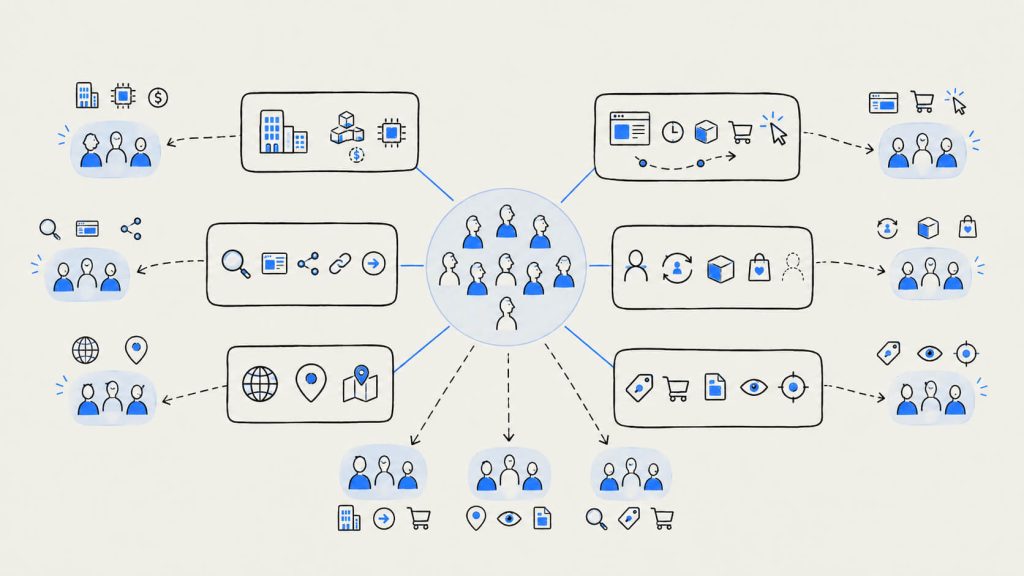
Most mature personalization programs stack a few of these together at once. A visitor might land in “enterprise firmographic, returning, high intent” simultaneously, and that combination gets its own dedicated experience.
Turn your segments into personalized experiences
Create your first personalized segment without waiting on a developer.
Cancel anytime.
Per-visitor Personalization Use Cases
Per-visitor personalization plays out differently depending on the business model. Here’s where it tends to show up in each.
B2B SaaS
- Homepage and pricing page content: A visitor who arrived through a competitor comparison search can land on a page built around that specific gap, while someone who searched “how does X work” gets an educational path instead.
- Dynamic landing pages: Pages that swap headlines, testimonials, and CTAs based on referral source and firmographic signals are one of the more reliable ways SaaS teams personalize and boost landing page conversion rate without rebuilding the entire site.
- Onboarding flows: A free trial user who explores the reporting feature first can get in-app prompts and follow-up emails built around reporting, while a user who heads straight for integrations gets a completely different nudge sequence.
- Product-led upsell prompts: Usage data (seats added, features touched, limits approached) can trigger in-app upgrade nudges tailored to what that account is actually doing, rather than a blanket upgrade banner shown to every user.
Ecommerce
- Product recommendations: Recommendation engines can be tuned to individual browsing and purchase history. These can lift average order value by close to 369% compared to generic recommendation modules.
- Dynamic category and homepage content: A shopper who’s browsed running shoes three times this week doesn’t need to see the same homepage as a first-time visitor.
- Full-journey personalization: Retailers layering personalization from homepage to cart to post-purchase email often see conversion gains land somewhere between 18 and 35% within the first three months.
- Cart abandonment flows: Showing the exact item someone left behind, alongside real inventory counts or shipping deadlines, converts far better than a generic “come back and see us” email.
Segment-based Personalization Use Cases
Segment-based personalization tends to anchor a different set of decisions than per-visitor personalization does. Here’s where it shows up most in each model.
B2B SaaS
- Ad-to-page message match: If a visitor clicks a LinkedIn ad targeted at healthcare companies, the landing page they arrive on should reference healthcare compliance, healthcare case studies, and relevant integrations rather than a generic pitch built for everyone. Ad-to-page segmentation keeps that messaging consistent and lets your team decide exactly what claim goes in front of which audience, something that matters a lot in regulated industries.
- Segmented pricing pages: Startups tend to want a self-serve monthly plan front and center, while enterprise buyers are looking for a “contact sales” path and security documentation. Segmenting by company size, or by the page a visitor arrived from, lets you surface the right pricing structure without a fully dynamic per-visitor system.
- Industry-specific content blocks: Swapping case studies, logos, and testimonials based on a visitor’s declared or inferred industry keeps proof points relevant without personalizing every element of the page.
Ecommerce
- Loyalty and purchase-history offers: Customers who buy every month get early access to new drops while customers who haven’t purchased in 90 days get a win-back discount. Neither case needs individual-level personalization to work, the segment itself is doing the targeting.
- Geographic segmentation: You can shift currency, shipping estimates, and product availability entirely based on a visitor’s region
- New vs. returning visitor offers: First-time visitors might see an introductory discount, while returning customers see a different, loyalty-focused message instead of the same acquisition offer on repeat.
Personalization and Segmentation With CROLabs
Running either approach well takes two things working in tandem. They are a way to actually build the segments or the personalized variants and a way to confirm they’re driving conversions rather than just changing the page for the sake of it.
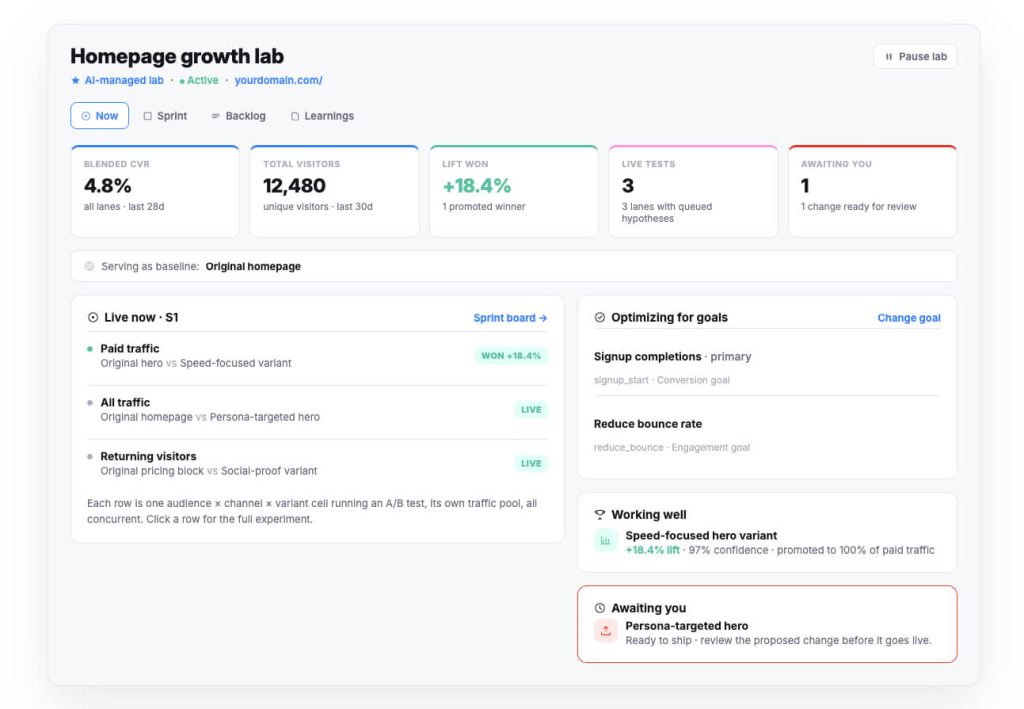
CROLabs’ audience personalization lets you build segments based on traffic source, behavior, device, and more. It then serves different content to each group without pulling a developer into the process.
For teams running paid traffic to different audiences, ad-to-page personalization keeps landing pages matched to the specific campaign or ad group a visitor clicked, which is one of the more direct ways to improve landing page conversion rate.
Of course, none of this carries weight without validation. And that’s why a/b testing is important. CROLabs’ testing tools let you run a/b test ideas directly against your personalized and segmented variants, so instead of assuming a new enterprise-focused pricing page is working, you can measure the lift against a control. The CRO Advisor inside CROLabs also crawls your site and flags where visitors are dropping off, giving you a starting list for what to segment or personalize first.
Teams earlier in their growth, without the traffic volume for true per-visitor personalization, are usually better off starting with a handful of well-built segments and testing each one properly. More granular, per-visitor experiences can come later, once there’s enough traffic and history to support them.
If cookies and third-party tracking are a concern for your stack, you should read up on cookieless personalization before committing to either approach.
Conclusion
Per-visitor personalization and segment-based personalization solve different problems for teams at different stages. Neither one is automatically the right call for every team, and plenty of mature CRO programs end up running both at once.
With some testing, you can hold both approaches together. Whether you’re personalizing by segment or by individual visitor, running it against a control through structured a/b testing is the only way to know if it’s actually helping, or just changing what the page looks like.
For more ideas on where to start, CROLabs’ guide on website personalization strategies and landing page personalization examples are good next reads.
Ready to put personalization to the test?
Cancel anytime.
FAQ
Is per-visitor personalization better than segment-based personalization?
Neither one wins across the board. Per-visitor personalization tends to perform best on sites with enough traffic and behavioral data to train on. Segment-based personalization tends to perform best on newer sites, or in cases where a team needs tight control over messaging, like regulated B2B industries.
How much traffic do I need before per-visitor personalization is worth building?
There isn’t a single threshold that applies to every business, but most teams need at least a few thousand monthly visitors with real behavioral signals, multiple page views, return visits, and product interactions before a per-visitor system has enough to work with.
Can segmentation and per-visitor personalization run at the same time?
Yes, and a lot of mature CRO programs run exactly that setup. Segments handle the broad strokes, like message match for a specific campaign or industry, while per-visitor personalization fine-tunes the experience within that segment based on individual behavior.
Do I still need a/b testing if I’m already personalizing my pages?
Yes. Personalization without testing is a guess dressed up with better production value. Running a/b test ideas against your personalized and segmented variants is how you confirm they’re improving conversion rate, not just changing it.
What’s the fastest way to start with segmentation?
Start with traffic source. Build one segment for paid traffic and one for organic, match landing page copy to whatever brought each group there, and test the result against your current page before expanding into more granular segments.